
Enable RWA Trading
To trade tokenized real-world assets (RWAs) through 0x, your team accepts the RWA trading agreement once in the 0x Dashboard. Access applies to every app and API key on the team and takes effect immediately. You don’t apply, wait for review, rotate keys, or change code.
New to RWAs on 0x? Start with Introduction to RWAs.
Before you begin
- You need a 0x account and a team. See Create a 0x API Key.
- Have your legal or compliance team review the agreement. You accept it on behalf of your organization.
Opt in
New teams see an RWA step during signup. You can accept it there, or skip it and opt in later from the dashboard.
To opt in from the dashboard:
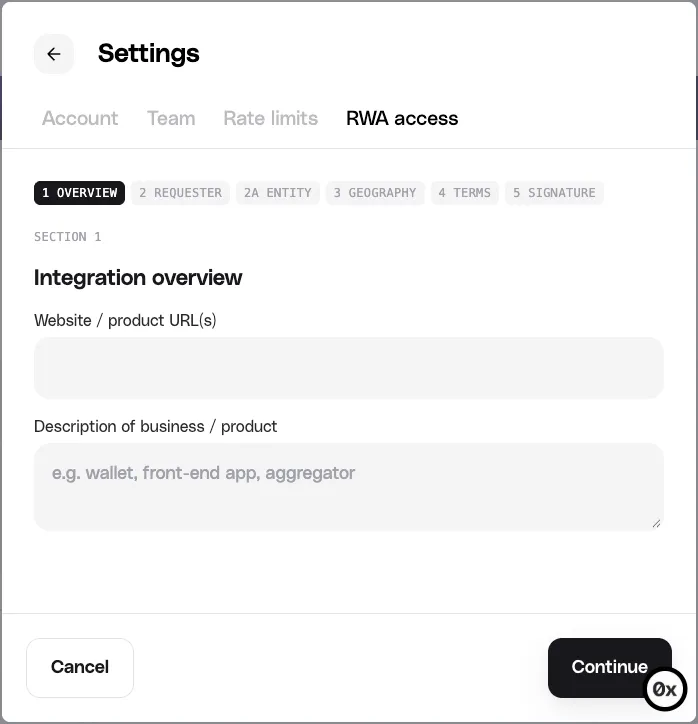
Sign in to the 0x Dashboard, open Settings, and select the RWA access tab.
Complete each section of the request form, then submit:
- Overview: your website or product URLs and a short description of your business, such as a wallet, front-end app, or aggregator.
- Requester: details about you, the person submitting the request.
- Entity: the legal entity you are requesting access for.
- Geography: where you offer your product.
- Terms: review and accept the Regulated Digital Assets Terms.
- Signature: sign on behalf of your organization.
Confirm RWA access is live
The RWA access tab shows your team’s status. Before you request access, it shows Not enabled.
Have a question?
Message us through the Pylon Messenger in the bottom-right corner of the 0x Dashboard, or contact 0x Support about the agreement.