

To allow a third-party service—such as the 0x API—to move your ERC-20 tokens, you must first grant a token allowance. When using 0x APIs, this means approving either AllowanceHolder or Permit2 to move tokens on your behalf.
Which contract to approve depends on the API endpoint you’re using:
The wallet holding the tokens (taker) must approve the contract address returned in issues.allowance.spender or allowanceTarget from the /price or /quote response.
No allowance is needed for wrapping/unwrapping ETH (e.g., WETH ⇄ ETH). In
these cases, allowance is null.
In API v2, allowance management and swap execution are handled by different contracts.
/swap/permit2) or AllowanceHolder (/swap/allowance-holder), depending on the approval method.issues.allowance.spender or allowanceTarget.data payload here./swap/permit2) or AllowanceHolder (/swap/allowance-holder), depending on the approval method.transaction.to.This separation enhances security by isolating allowance management from swap execution.
NEVER set an allowance on the Settler contract. Doing so may result in unintended consequences, including potential loss of tokens or exposure to security risks. The Settler contract does not support or require token allowances for its operation. Setting an allowance on the Settler contract will lead to misuse by other parties.
ONLY set allowances on AllowanceHolder or Permit2 contracts, as indicated by the API responses.
The correct allowance target is returned in issues.allowance.spender or allowanceTarget.
Example response from /swap/permit2/quote will return back the contract address if an allowance needs to be set:
You can approve allowances programmatically or via UI:
wagmi provides a clean interface for reading and writing allowances:
useReadContract.useSimulateContract and useWriteContract.useWaitForTransactionReceipt.Here’s a minimal example:
For a full implementation, see:
AllowanceHolder
Permit2
You can manually set allowances via Etherscan:
_spender: the issues.allowance.spender address from the API._value: the maximum uint256 value (2^256 - 1).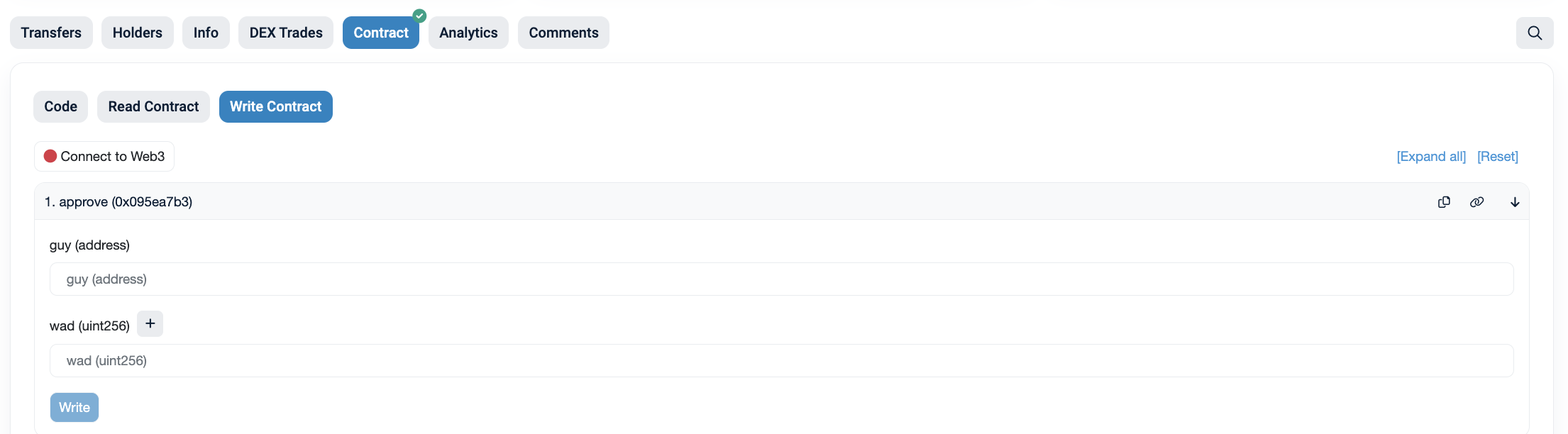
To revoke an allowance, you will need to set the allowance to 0. This can be done programmatically or through a UI such as https://revoke.cash/ .
When setting the token allowance, make sure to provide enough allowance for the buy or sell amount as well as the gas; otherwise, you may receive a ‘Gas estimation failed’ error.