

TL;DR CORS errors happen because the 0x API enforces strict security policies. Avoid making API calls directly from the browser to prevent CORS issues and exposing your API keys. Instead, use a backend server, serverless functions, or a full-stack framework.
Error Message You might see an error like this:
Explanation
This error occurs because browsers block requests with custom headers (e.g., 0x-version) unless explicitly allowed by the server. Making API calls from a browser is not recommended because it can expose your API keys.
Recommended Solutions
axios in Node.js or requests in Python).See Handling API issues and error codes for a full list of common 0x issue types and error codes and how to resolve them.
If your 0x quote is reverting, besides the standard revert issues related to ETH transactions, check the following:
sellToken?sellToken balance to execute the swap?For more details, see FAQ.
RFQ quotes from Market Makers are only valid for a short period (roughly 60s on mainnet).
Two ways to check:
getOTCOrderInfo in the trace and inspect expiryAndNonce.expiryAndNonce.Best practice: refresh quotes about every 30s to prevent RFQ expiry. See Matcha.xyz for an example.
Some subset of 0x orders may revert (not fill) while the overall transaction succeeds. This is expected: due to timing/pricing, some orders may be filled or expired before a user attempts to fill. The protocol uses fallback orders to compensate, resulting in a successful transaction even though internal order reverts occurred.
How does including taker in the API call help with catching issues?
Passing a taker lets 0x API provide a bespoke quote and catch revert issues:
taker to execute the quote.gas in the quote reflects an accurate execution estimate.taker.TL;DR Pass taker to validate quotes and avoid many revert cases.
I received an INPUT_INVALID error. Help!
I received BUY_TOKEN_NOT_AUTHORIZED_FOR_TRADE or SELL_TOKEN_NOT_AUTHORIZED_FOR_TRADE. Help!
The buy token is not authorized for trade due to legal restrictions.
I received an INTERNAL_SERVER_ERROR error. Help!
An internal server error occurred.
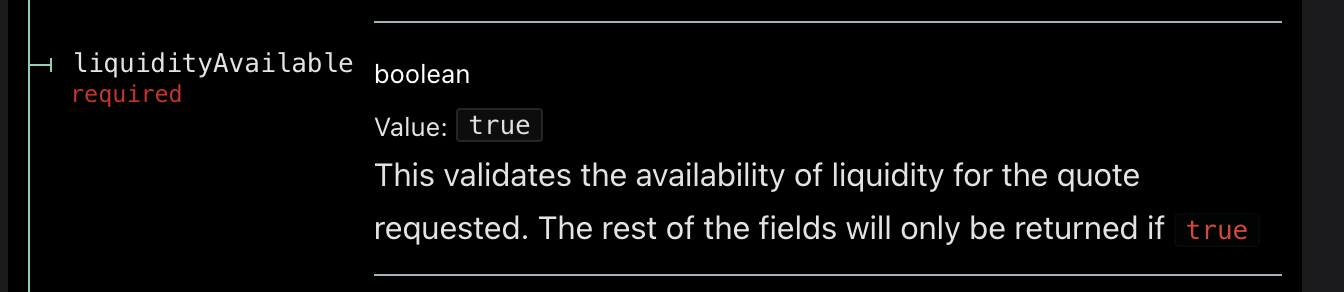
The API will return liquidityAvailable=false and omit other response params if there isn’t enough liquidity available for the requested quote.
Use the getSources endpoint.
Use the getSources endpoint.
Use the getChains endpoint to get a list of supported chains for Swap.
We offer two transparent, flexible tiers for Web3 businesses of all sizes. You can get started here. If you are a high-volume app or have a unique business model, please contact us to discuss a custom plan.
0x takes an on-chain fee on swaps for select tokens for teams on the Standard tier. This fee is charged on-chain to your users during the transaction. In cases where we charge a fee, we return the value in the API response as zeroExFee. See the Swap API reference for details.
Swap API samples each liquidity source and adjusts for gas consumption (using your specified gas price, or a fast default) and any associated fees. It evaluates different compositions of sources to select the best set of orders, and also creates fallback orders to ensure executability.
Example: Curve’s nominal price may look best, but after factoring gas * gasPrice and fees, it may not be optimal.
0x supports all tokens by default except those blocked for compliance reasons.
If you’d like to trade a custom token, you’ll need to create liquidity by deploying a pool on an AMM the API sources (e.g., Uniswap, SushiSwap, Curve).
MEV protection applies to RFQ orders, which are filled privately and atomically to prevent sandwiching/front-running. It does not apply to AMM trades, which execute on public mempools and are subject to typical MEV risks.
You can collect affiliate fees or trade surplus. Read the full guide: monetizing your swap integration.
If swapFeeRecipient, swapFeeBps, and swapFeeToken are set, the response includes fees.integratorFee.amount which you can display to users.
Example for 1% of 100 USDC:
sellToken=0xA0b8…eB48 (USDC)swapFeeToken=0xA0b8…eB48sellAmount=100000000 (USDC has 6 decimals)swapFeeBps=100Fee amount = 1000000 = 1 USDC.
See the guide: monetization. In API v2, you can take fees on buyToken or sellToken.
Available to select integrators on a custom pricing plan. Contact support. See the monetization guide.
0x Swap API supports two allowance methods: AllowanceHolder (recommended) and Permit2 (advanced).
AllowanceHolder (Recommended)
Better UX, lower gas, simpler integration, and safe defaults. Great for aggregators, teams upgrading from Swap v1, and advanced wallets (multisigs/smart accounts).
Endpoints:
Allowance target is returned in issues.allowance.spender or allowanceTarget.
Chain-specific AllowanceHolder addresses (verify with official docs before hardcoding):
0x0000000000001fF3684f28c67538d4D072C22734 — Cancun hardfork chains (Ethereum Mainnet, Arbitrum, Avalanche, Base, Berachain, Blast, BSC, Ink, Linea, Mode, Monad, Optimism, Plasma, Polygon, Scroll, Sonic, Unichain, World Chain)0x0000000000005E88410CcDFaDe4a5EfaE4b49562 — Shanghai hardfork chains (Mantle)Permit2 (Advanced Only)
Enables time-limited/granular approvals but requires a double-signature flow. If you use Permit2, set allowances on Permit2 only — never on the Settler (funds may be lost).
Endpoints:
Permit2 address (all chains): 0x000000000022D473030F116dDEE9F6B43aC78BA3
Read more about the contracts here.
Depends on UX and integration type:
AllowanceHolder: single-signature UX, consistent across sources, similar to Swap v1.
Permit2: universal approvals and time-limited/granular allowances; requires an extra signature.
If an allowance is needed when using AllowanceHolder, which contract will issues.allowance.spender or allowanceTarget return?
The AllowanceHolder contract.
How should the signed Permit2 EIP-712 (permit2.eip712) message look?
Ethereum signatures: r, s, v, ordered as r, s, v, where:
r < secp256k1ns < (secp256k1n / 2 + 1)v is 0 or 1; on EVM encode as 27 + v (27 or 28)Pack to 65 bytes: bytes 0–31 = r, 32–63 = s, 64 = v.
Gas is the fee required to conduct a transaction on Ethereum, paid in ETH and denominated in Gwei (1 ETH = 1,000,000,000 Gwei).
What is the significance of 0xEeeeeEeeeEeEeeEeEeEeeEEEeeeeEeeeeeeeEEeE?
It’s a standardized representation of native tokens (e.g., ETH, BNB, POL) which don’t have contract addresses like ERC-20s.
On Mantle, $MNT is an exception. It has the contract address 0xdeaddeaddeaddeaddeaddeaddeaddeaddead0000. Note this is not applicable to wrapped/bridged MNT. See Handling native tokens with 0x Swap API for additional information.
Does the 0x API return buyAmount in base units?
Yes. All buyAmount values are in the token’s base units.
1000000000000000000 = 1.01000000 = 1.0Useful helpers:
Is it possible to quote by the buyAmount?
No — in v2 only sellAmount is supported for more deterministic
behavior and broader liquidity support.
Can I skip validation for /quote by leaving the taker parameter blank?
No — taker is required in v2 for /quote. It enables
us to return calldata and identify issues that would cause failures.
Why does the value of the to field in /swap/quote vary?
The Settler contract can be redeployed; the to target address will therefore change. See: current/future Settler addresses.
Contact 0x to discuss a solution that best suits your use case.
When applicable, the fee is returned as zeroExFee in quotes. You
are responsible for showing the amount and token to
users. See the Pricing Page and
/quote response
.
Not currently, but we’re exploring this feature.
Options:
Import erc20Abi from
viem
.
Depends on your use case:
See the 0x transaction data guide.
Not directly via onchain data alone. While all 0x API trades settle through the Settler contract, transactions don’t include a unique tag that explicitly ties them to the API.
Use the getSources endpoint.
See the full list of supported chains
Short answer:
Gasless API provides a gasless experience at two points of the trade flow where users normally pay gas:
What doesn’t work:
You can’t use Gasless API to sell a chain’s native coin (e.g., ETH on Mainnet, POL on Polygon). Native coins aren’t ERC-20s, so they lack transferFrom which the relay system uses. Use the Swap API instead (user pays gas in the native token) or have users wrap the coin (e.g., ETH → WETH).
Work-arounds for tokens not supported by Gasless API:
Use the
Swap API
(user pays gas in the native token), or have users wrap the native coin first (e.g., ETH → WETH), then use Gasless API.
It varies by chain, size, and gas conditions. If the amount is too small, the API returns an error with the estimated minimum. As a guideline, set a minimum of about 1 on other chains.
Both enable gasless-like UX, but they serve different purposes.
In short: Permit (EIP-2612) is an ERC-20
extension enabling gasless approvals via an EIP-712 signature —
no on-chain tx — but only for tokens that implement EIP-2612. Many
older tokens (e.g., WETH) don’t, so they still need a regular
approve().
Permit2 (by Uniswap Labs) is a universal approval contract
for any ERC-20. Users first do a standard gasful approve() to
Permit2, then future moves can be authorized via EIP-712 signatures (gasless
for subsequent swaps). This is useful when tokens don’t support
permit() but you want a consistent meta-tx flow. Permit2 is
deployed at
0x000000000022D473030F116dDEE9F6B43aC78BA3 on major chains.
0x covers the gas fee up front. The cost is wrapped into the trade and paid in the token the user is trading. Applications may choose to sponsor transactions; in that case they pay 0x directly and users are not billed on chain.
You have full flexibility on the fees you collect on trades.
Include these parameters when making a Gasless API request:
swapFeeRecipient — Wallet address to receive trading fees.swapFeeBps — Fee in basis points (0–1000; 1000 Bps = 10%).swapFeeToken — Contract address of the token to receive fees (must be buyToken or sellToken).Gasless approvals are supported only for tokens listed in the gasless approval token endpoint.
Check the response from /gasless/quote,
If issues.allowance is not null, an allowance
approval is required.
If approval is not null, a gasless approval is
possible.
Gasless approvals and gasless swap are bundled in the same transaction, but each requires a signature for its EIP-712 object. You can design the UI so it feels like a single step to the user.
The Trade Analytics API gives integrators easy access to the history of trades initiated through 0x APIs and settled on 0x Smart Contracts. This API offers comprehensive transaction records, providing useful insights into user trading behavior.
The Trade Analytics API will only return data for the app associated with the API key that makes the request. While all trading data is publicly available onchain, the Trade Analytics API provides a streamlined, well formatted data for the specific app making the request.
The data accessed through the API is deemed final 48 hours after a trade is completed. This delay allows time for the data pipeline to capture all relevant information, including fees from proxy contracts and updated USD prices from Coingecko.
To ensure that your trading data is up to date, we recommend that you fetch and update data from the preceding 2 days in addition to the current day.
Data is updated roughly every 15 minutes. While generally reliable, data from these updates can sometimes be missing or incomplete, especially if they have a dependency on external sources such as token USD price providers. Each trade data is considered final 48 hours after it’s mined onchain – this enables us to address any gaps from earlier updates, ensuring data accuracy.
We don’t recommend using this API for use cases that require real time updates. If you’re interested in such data, please submit a feature request.
It’s a common question — and the short answer is: not directly via onchain data alone.
While all 0x API trades are settled through the 0x Settler smart contract, these transactions don’t include a unique tag or flag that explicitly ties them to the API.
That said, there are a few ways to approach attribution, depending on what you’re trying to track:
🔍 If you’re trying to track your own app’s activity
🌍 If you’re trying to detect any and all transactions routed via the 0x API
We understand attribution is an important use case, whether you’re tracking your own usage or seeking broader ecosystem insights. Don’t hesitate to contact us to discuss how we can best support you.
Trade Analytics API is best for historical analysis and business intelligence. Provides comprehensive trade data including volumes, fees, and USD values.
0x-parser is a best for real-time transaction data and displaying final swap amounts immediately after settlement.
Read more about accessing 0x transaction data here.
For now we only support one user per team account, but we will add support for multiple users in the coming weeks.
An app is a self-contained unit for each application that you’re building. You can set up multiple apps, each with unique API keys and configurations, on the 0x Dashboard.
Create an account on the 0x Dashboard to get an API key and start building for free. You can also review plans and contact our team for custom needs.
Thank you for your interest in providing liquidity to the 0x ecosystem. Please refer to the “Liquidity Integrations” tab.